
-
-
-
- *Unavailable via PRESTIA Mobile, App
-
Fund Transfers:
Domestic Fund Transfer Acceptance History
Overseas Remittance History
Registered Payee List
Transfers Within My Accounts (Same Currencies)
-
Buy / Sell FX, Foreign Currency Deposit Service, Order Watch:
Application for PRESTIA MultiMoney Foreign Currency Savings Deposit
Archive of Product Information Memorandum, etc.
-
Time Deposits:
Premium Deposit (Structured Deposit)
Personal Profiling
Archive of Product Information Memorandum, etc.
-
PRESTIA MultiMoney Credit:
-
-
E-mail Registration / Maintenance:
Manage Information and Services:
One Time Password (OTP):
GLOBAL PASS (Multi Currencies Visa Debit with Cash Card)
Unsubscribe Statement via Post
-
-
-
Change Domestic Cash Card PIN (Domestic ATMs / J-Debit)
STEP 1Input Registration Details
- 1.Please input Current PIN.

Customers who have multiple Yen Accounts :
Please press "Select an Account" and select the account you wish to change PIN.

- 2.Please input the New PIN you want to register twice.
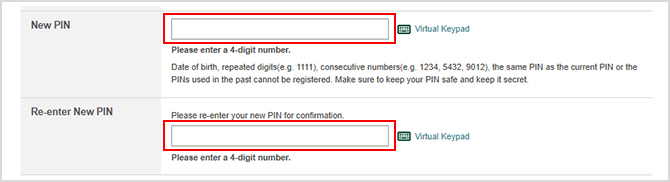
- *You can change PIN used for domestic ATM transactions and purchases at J-Debit merchants.
- *You cannot change your Debit PIN (used for purchases at Visa merchants and for overseas ATMs transactions) on this screen. To change the Debit PIN, your card must be reissued. More details.
- *Please note that if you consecutively enter your current PIN incorrectly more than the predetermined number of times, your Domestic Cash Card PIN will be blocked.
- *If you do not know your current PIN, please request a new PIN form here.
- *If you change your PIN, family card PIN will also change.
- 3.Please check the checkbox after reviewing the registration details, and then press "Submit."

New PIN will be effective immediately after you press Submit.
STEP 2Change Complete
The time your request was received will be displayed, and the PIN change is completed.
If you want to go back to top menu, please press "HOME"