



 Japanese
 English
 PRESTIA Mobile

Key Features of PRESTIA Online/Mobile
-
Security & Protection

PRESTIA Alert Services are activated automatically when you register for online banking. They help protect your account from financial crimes.
-
Transfer Discounts

Fees for domestic transfers to other banks and overseas remittances are discounted. PRESTIA Gold Status customers can use these services free of charge.
-
Real-Time FX Rates

In principle, exchange rates are applied based on prevailing market rates.
-
Paperless Asset
Management
Once registered, you can immediately check your account balances and transaction history (past 180 days), as well as transaction statements and balance reports (past 6 years).


Transactions & Services Available via PRESTIA Online/Mobile
- Convenient Banking Services
-
- Account Details and Activities
- Statement/Torihikizandaka-hokokusho
- Domestic Fund Transfers/Overseas Remittance
- Transfers within my accounts (Same Currencies)
- Manage Information and Services (eForm/Other Services*)
- Transaction Services
-
- Foreign Currency Exchange
- Yen/Foreign Currency Time Deposits
- Premium Deposit (Structured Deposit)
- Security Features
-
- PRESTIA Alert Service (transaction notification)
- Inquiry of Cash Card Withdrawal Limit
- One Time Password (OTP)
- Change PINs (Domestic Cash Card PIN / T-PIN only)*1
- Support
-
- Help Contents
- *1If you have forgotten your current PIN, you cannot change it online. More details.
*Other Services
The following procedures are available.
- Address Change Request *Domestic Only
- Register or update "Status of Residence" and "Period of Stay (Date of Expiration)"
- Kana Name Registration
- *This is a form to register your Katakana Name necessary to receive incoming domestic transfers or when applying for direct debit.
- Full Name Registration
- *This is a form to register your full name in English.
- Request for reissuance of GLOBAL PASS and/or change of Domestic Cash Card PIN
- *Available for GLOBAL PASS holders only
- Local Remittance Registration/Deletion Application
- Fixed Amount Automatic Remittance Application Form (For Domestic Transfer)
- Overseas Remittance Registration Application
- *Registration of remittance to Russia and Belarus is not accepted.
- Special Benefit Program
- *You can apply for or cancel the Special Benefit Program "PRESTIA Bank at Work".
- Mutual Fund Account CLOSE REQUEST
- *Available only when there is no balance
- *If you have not updated your registered address, please complete the address change in advance.
- Account Close Request
- *Available only for closure of all deposit accounts
- *If you have not updated your registered address, please complete the address change in advance.
- Reply to "Customer Information Confirmation"
- *For Customers who received Request for Submission of "Confirmation of Customer Information Form" by sealed postcard
POINTSMBC Trust Bank App for more convenient procedures
For detailed instructions on how to download the app and "Other Services", please see here.
Frequently Used Online Services
Foreign Currency Transactions

You can trade 17 foreign currencies, use the "Foreign Currency Deposit Service" or set up "Order Watch " to automatically execute trades when your desired FX rate is reached.
Buy / Sell FX, Foreign Currency Deposit Service, Order Watch Buy / Sell FX, Foreign Currency Deposit Service, Order Watch
Yen/Foreign Currency Time Deposits

Yen time deposits start from 100,000 yen (Super Teiki) or 10 million yen or more (Oguchi Teiki). Foreign currency time deposits offer 17 currencies and various terms, with options for "ENJOY PLUS" add-on interest rate or monthly interest payments.
Manage Information and Services

You can confirm your registered information, change online banking credentials, and use the "Various Procedures" service to update your address, register or update Status of Residence and Period of Stay, change your PIN, and more online.
Manage Information and Services Manage Information and Services
For First-Time Users: Get Started Now!
User registration is simple online, and you can start using PRESTIA Online/Mobile immediately.
All you need is your cash card and telephone transaction PIN. If you have an account, simply register your User ID and password to begin transactions right away-no need to send any documents.
How to Register as a User
STEP
1
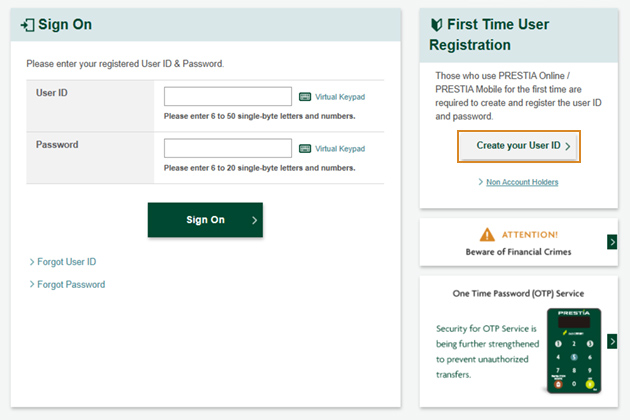
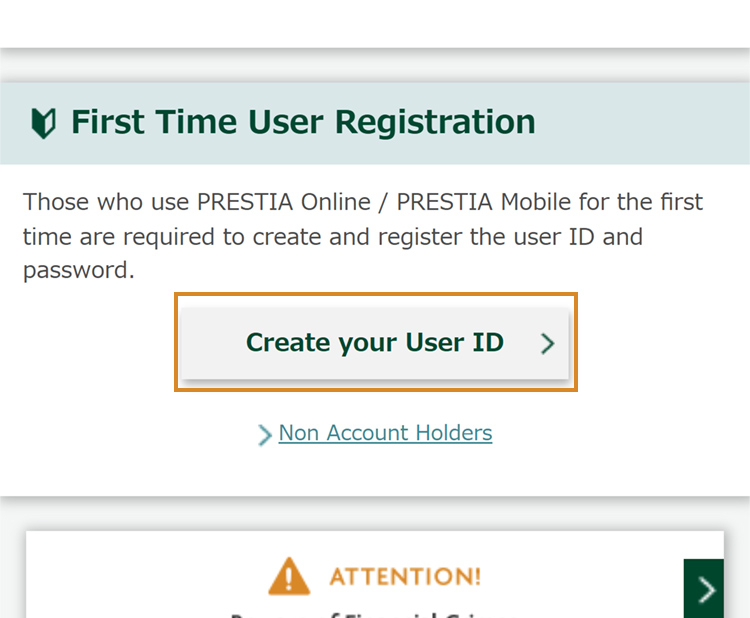
Go to the User Registration page
Access PRESTIA Online/Mobile Sign-on page.
Press "Create your User ID".
Access from your smartphone is also available.
STEP
2
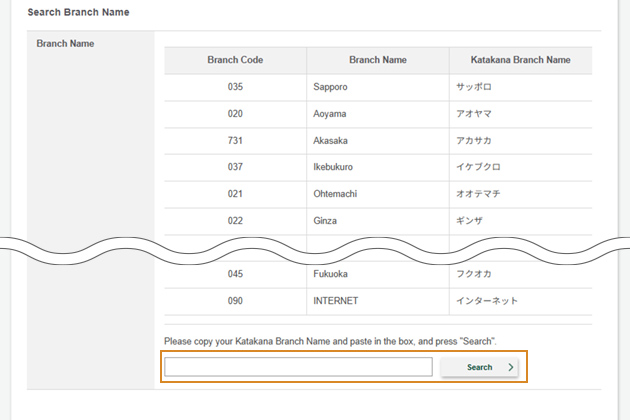
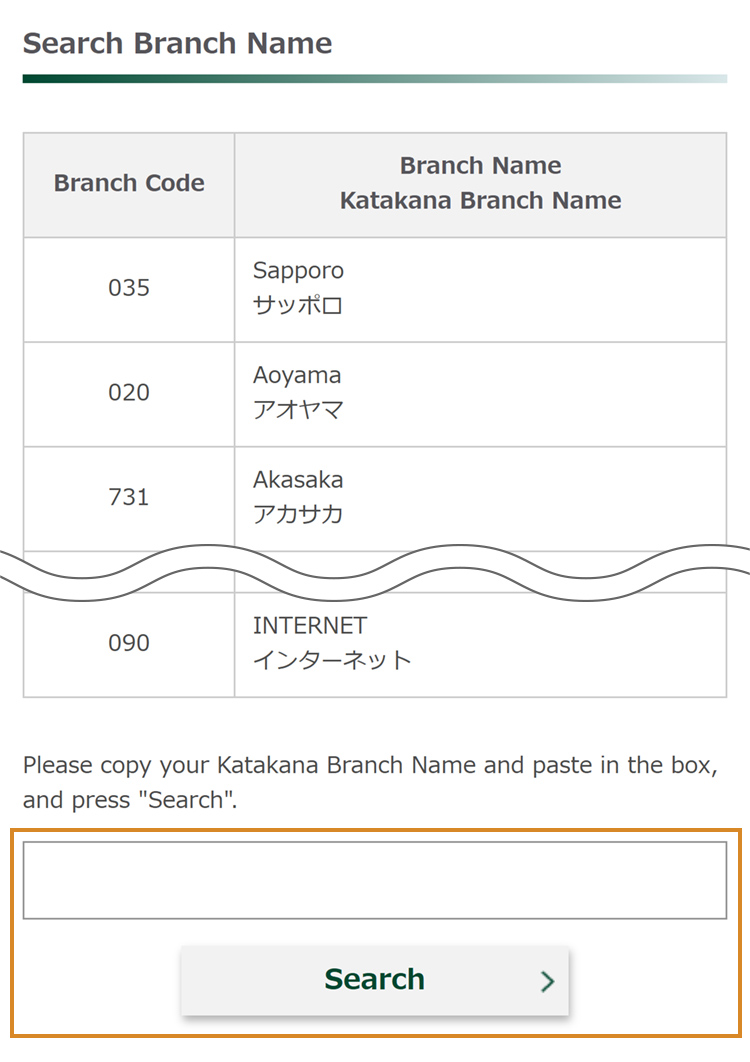
Find Your Branch
Input your Katakana Branch Name and press "Search" (You can also copy your Katakana Branch Name from Branch Name list and paste in the box).
STEP
3
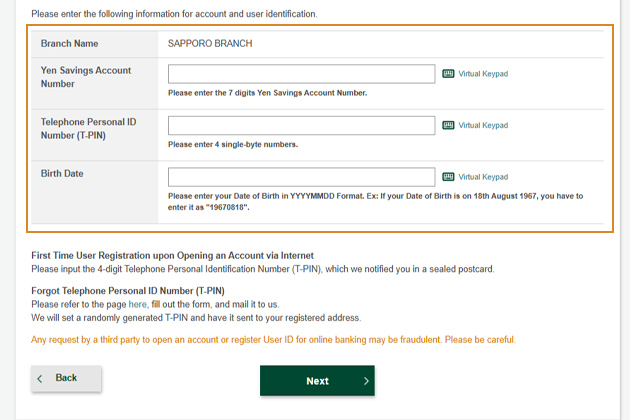
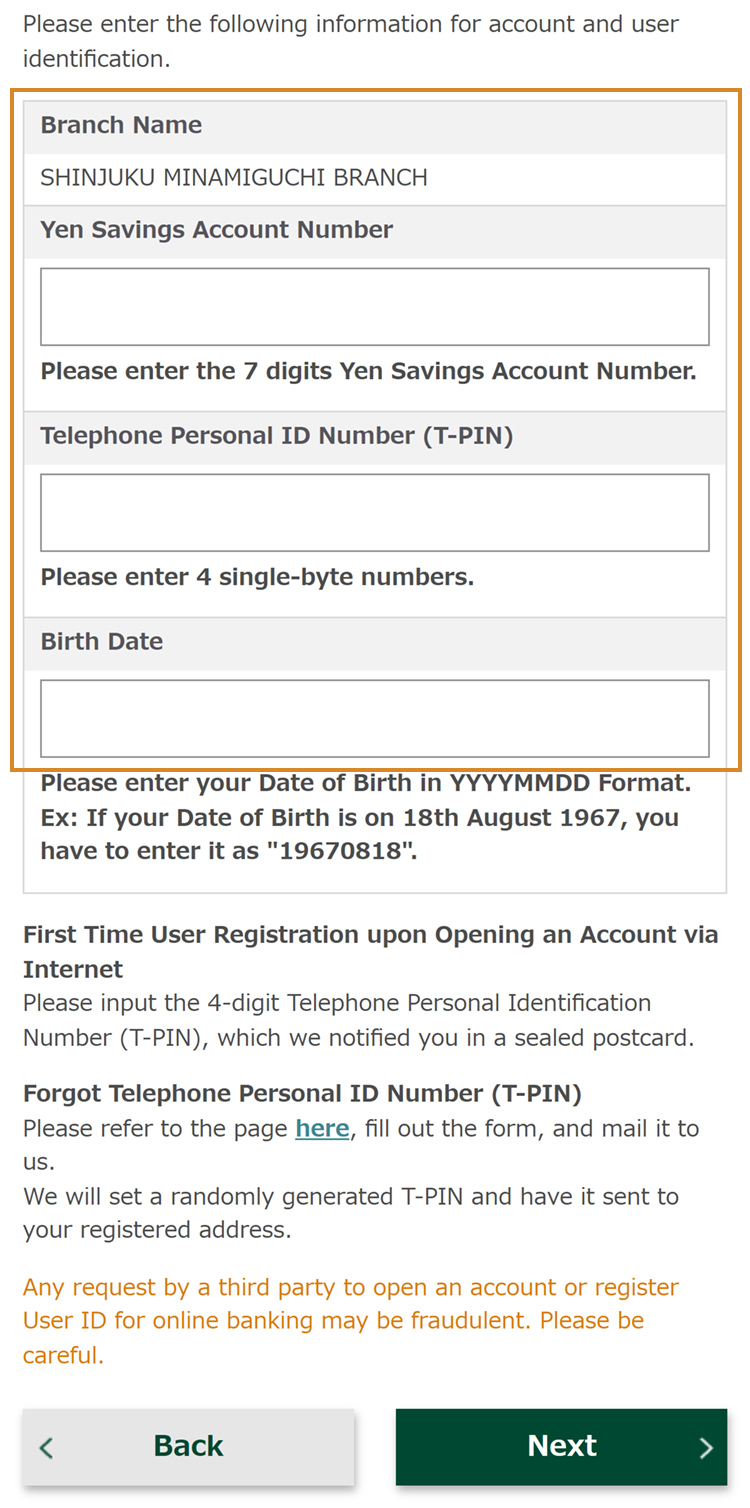
Enter Account Details
Please enter the following 3 information.
- 1Yen Savings Account Number*1
- 2Telephone Personal ID Number (T-PIN)*2
- 3Birth Date
- *1Yen Savings account number is the 7-digit number on your Cash Card.
- *2This is the 4-digit PIN you set at account opening at the branch or received by mail. If you have forgotten your Telephone Transaction PIN, please re-register here.
STEP
4
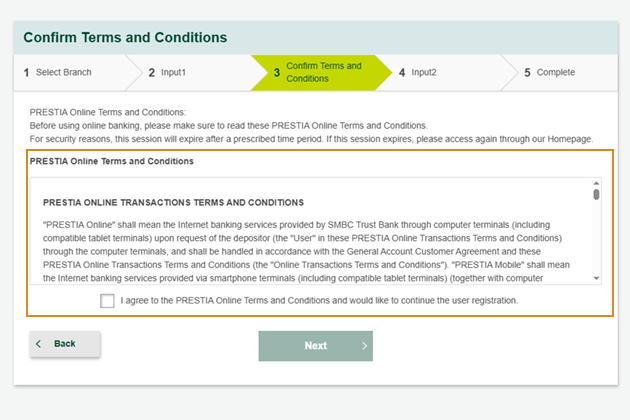
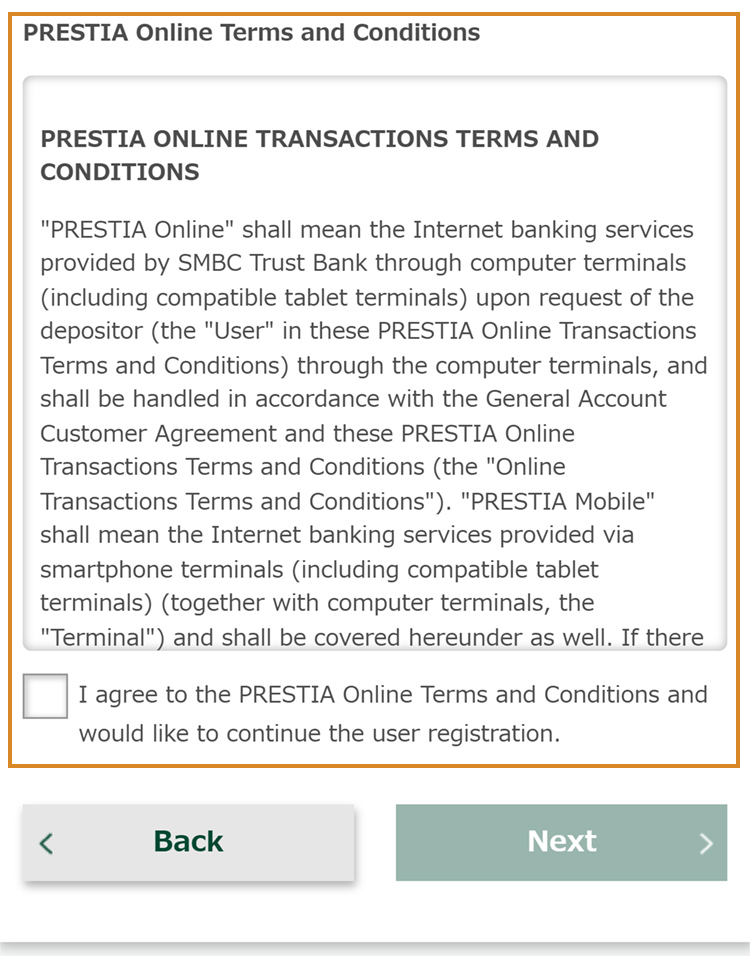
Review and Agree to Terms and Conditions
After confirming and agreeing to the Terms and Conditions, proceed to the next screen. You can also review the Terms and Conditions on this page.
STEP
5
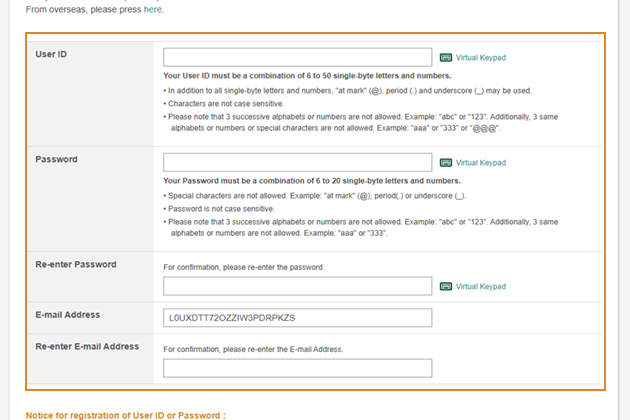
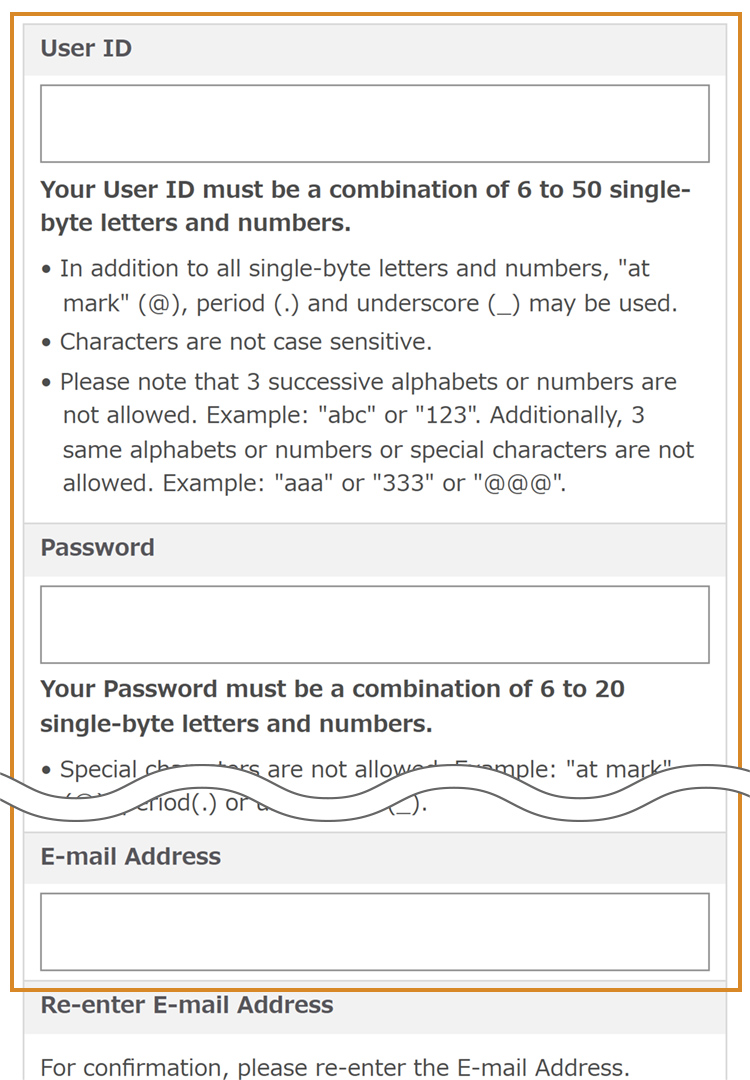
Set Up User ID, Password, and Email Address
Please register your desired User ID and Password.
From next time, you will be able to Sign On using this User ID and Password.
You can also register an E-mail address.
Go to the User Registration page
STEP
2
Find Your Branch
Input your Katakana Branch Name and press "Search" (You can also copy your Katakana Branch Name from Branch Name list and paste in the box).
STEP
3
Enter Account Details
Please enter the following 3 information.
- 1Yen Savings Account Number*1
- 2Telephone Personal ID Number (T-PIN)*2
- 3Birth Date
- *1Yen Savings account number is the 7digits on your Cash Card.
- *2This is the 4-digit PIN you set at account opening at the branch or received by mail. If you have forgotten your Telephone Transaction PIN, please re-register here.
STEP
4
Review and Agree to Terms and Conditions
After confirming and agreeing to the Terms and Conditions, proceed to the next screen. You can also review the Terms and Conditions on this page.
STEP
5
Set Up User ID, Password, and Email Address
Please register your desired User ID and Password.
From next time, you will be able to Sign On using this User ID and Password.
You can also register an E-mail address.
User Registration User Registration
After selecting the above button, first-time users should proceed by choosing "Create your User ID".
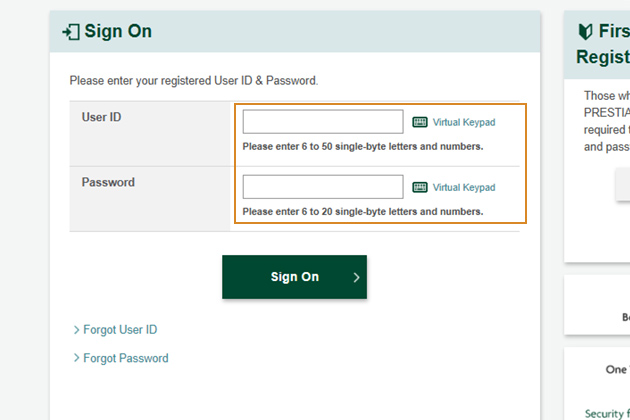
How to Sign On
STEP
1
Open the Sign-on Page
Access PRESTIA Online/Mobile Sign-on page.
STEP
2
Enter User ID and Password
Please enter your registered User ID and Password and press the "Sign On" button to use PRESTIA Online/Mobile.
POINT
You can increase the security setting by additionally using the One Time Password (OTP) service when signing on.
How to Sign On
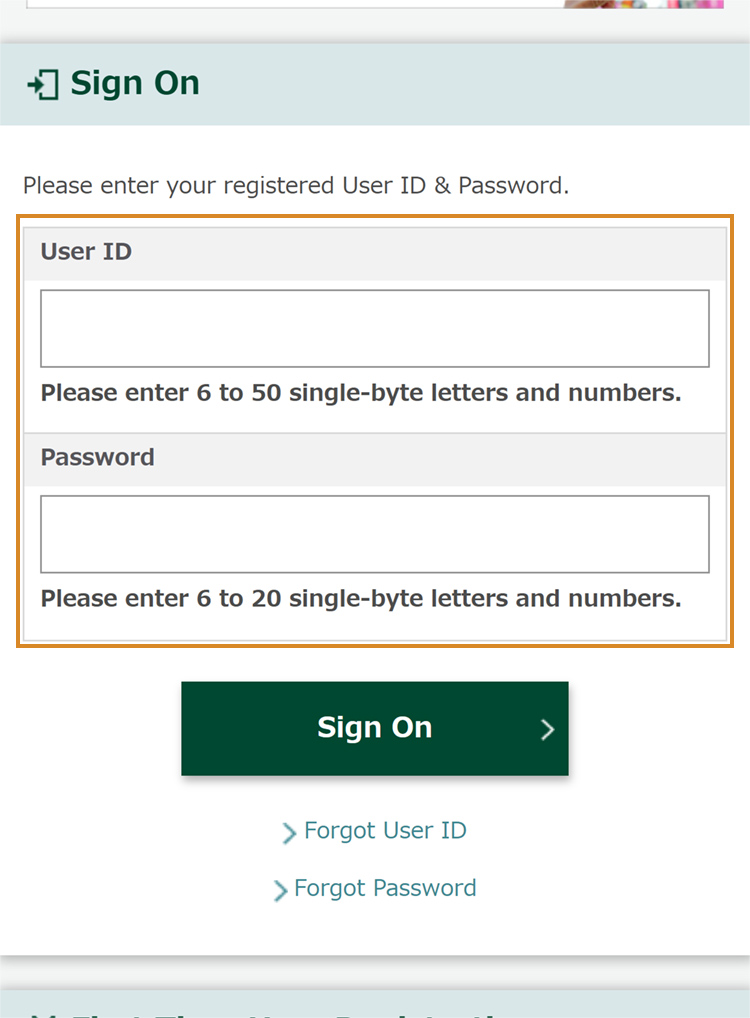
STEP
1
Open the Sign-on Page
Access PRESTIA Online/Mobile Sign-on page.
STEP
2
Enter User ID and Password
Please enter your registered User ID and Password and press the "Sign On" button to use PRESTIA Online/Mobile.
POINT
You can increase the security setting by additionally using the One Time Password (OTP) service when signing on.
Token Application
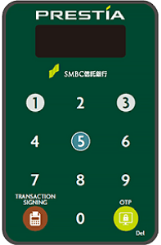
A token is required to complete certain procedures via online banking. After completing user registration, please remember to apply for your token!
Token Application
A token is required to complete certain procedures via online banking. After completing user registration, please remember to apply for your token!
Available Procedures
- Change phone number within Japan
- Domestic Fund Transfer (Unregistered Payee)
- Address change within Japan, for non-mutual fund account holders (Japanese only)
- *Tokens are provided only for usage inside Japan.
- *Tokens will be sent to your registered address. If you have moved, please change your registered address before applying for a token.
Regarding the Use of PRESTIA Online/Mobile
Please note that some customers may not be able to use PRESTIA Online/Mobile or certain services.
Not eligible for some services:
- Corporate accounts
- Non-resident accounts
- Under 18 years of age
Not eligible for PRESTIA Online/Mobile:
- Yen Savings Account only
- PRESTIA MultiMoney Account only
- Address not confirmed by the bank